

Running an AI model on your own hardware means no per-token bill, no data leaving the building, and nothing that can be deprecated out from under you. It also means doing the work a hosted API does for you. This guide is the route through that, in the order the decisions actually arrive.
The open-weight models — Llama, Mistral, Qwen, DeepSeek and others — are already downloaded onto private servers and laptops in very large numbers. No company or government can recall them. Whatever happens to the hosted market, that capability is now permanent, and this is how to use it.
Start here: what will actually fit
Nearly every mistake people make starts with choosing a model before checking whether it fits in memory. The arithmetic is simple and it decides everything downstream.
At the common Q4_K_M quantisation, budget roughly 0.6 GB per billion parameters, plus a few GB for context and the operating system:
| Model size | Memory needed | Typical machine |
|---|---|---|
| 7B / 8B | ~4.4–6 GB | Most modern laptops |
| 13B / 14B | ~8–9 GB | 16 GB RAM, or a 12 GB GPU |
| 32B | ~19–20 GB | 24 GB GPU, or a 32 GB Mac |
| 70B | ~40–48 GB | Two GPUs, or a high-memory Mac |
Note the last row, because it is the expensive misunderstanding: a 70B model at Q4 does not fit a 24 GB consumer graphics card.
- How much VRAM you need to run a local LLM — the arithmetic in full, including context.
- How much RAM and storage a laptop needs — if you are buying rather than using what you have.
- The best GPU for local AI in 2026 — what the money actually buys.
- Snapdragon against Apple Silicon — unified memory wins on what fits, a discrete GPU on how fast.
Choosing a model
Once you know your size budget, the question narrows to which model at that size. Public benchmarks measure average performance on generic tasks; you care about one job with your own data, and the two frequently disagree. Install two candidates and run your real prompt through both — ten minutes of that beats any comparison article, including ours.
- The best local LLM models in 2026 — the current field by size band.
- Ollama vs LM Studio vs llama.cpp — the three ways to run them, and who each suits.
- DeepSeek V3 against Llama 3.3 — a head-to-head, with the hardware each needs.
- DeepSeek R1 reviewed — the reasoning model, and its distilled versions.
- How to run local LLMs — the short practical version.
Does it actually save money?
Sometimes, and the answer depends almost entirely on volume. A hosted API has no fixed cost and a per-token price; local inference is the reverse. There is a crossover point, and below it the API is simply cheaper.
Where local wins regardless of volume is on the things money does not price: data that cannot leave the building, work that must continue during an outage, and a model that cannot be changed or retired without your consent.
Local LLM against API costs works the crossover out properly.
Making it answer on your own data
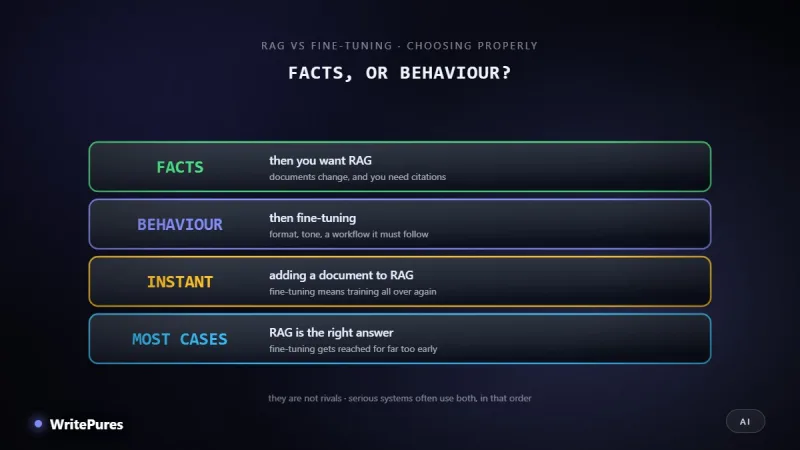
A base model knows nothing about your documents. Two approaches close that gap, and they solve different problems — which is why the choice between them is the most common early mistake.
RAG retrieves relevant passages and puts them in the prompt. It is the right answer for facts that change, and for anything you need the model to cite. Fine-tuning adjusts the model itself. It is the right answer for form, tone and format — not for knowledge.
Most people asking for fine-tuning want RAG.
- RAG vs fine-tuning: which do you need? — the decision, made quickly.
- When fine-tuning is actually worth it — the narrower case, and what it costs.
- RAG in production — hybrid search, rerankers and what breaks at scale.
Working with it every day
- A local AI coding assistant — code completion with nothing leaving your machine.
- Open-source alternatives to expensive SaaS — the wider self-hosting case.
The step-by-step tutorials
The articles above are orientation. When you want to sit down and do it, these are the worked walkthroughs, in chapters.
- Run Open-Weight AI Models Locally — ten chapters from hardware check to serving a local API, covering Llama, Mistral, Qwen and DeepSeek individually.
- Build a Private RAG Over Your Own Documents — point a local model at your own files, end to end.
- Self-Hosting on a VPS, From Zero — if the model should run on a server rather than your laptop.
If you only do one thing
Install Ollama, pull a 7B or 8B model, and run one real prompt from your own work through it. It takes about ten minutes, costs nothing, and tells you more about whether this is worth your time than any amount of reading. Then come back for the memory arithmetic, because the next question will be whether you can run something larger.


0 Comments
Join the conversation
Replying toNo comments yet. Be the first to share your thoughts.