
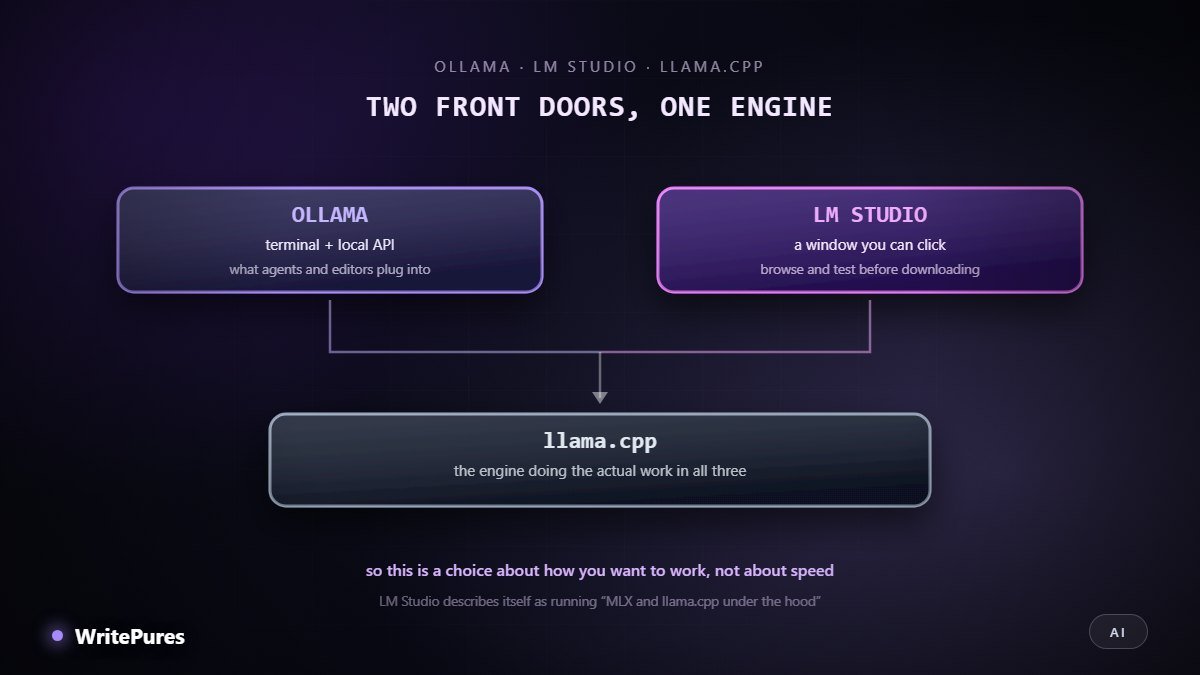
Search this comparison and you will find benchmark tables arguing over a few percent of tokens per second. They are measuring the wrong thing. Ollama and LM Studio are both front ends over the same engine, so the question is not which is fastest — it is which way of working suits you.
The Thing Most Comparisons Miss
llama.cpp is the engine. Ollama and LM Studio are two different doors into it.
This is not an inference — LM Studio states it on its own site, describing itself as powered by its runtime "with MLX and llama.cpp under the hood". MLX is Apple's framework, used on Apple Silicon; llama.cpp handles the rest.
Once you know that, the usual framing collapses. Two tools wrapping the same inference engine on the same hardware with the same quantised weights are going to perform within a narrow band of each other. Published benchmarks bear this out and contradict one another on direction: one comparison found LM Studio around 11% faster on an NVIDIA RTX card and around 17% slower on an Apple M3 Max. Differences in the 10–20% range, varying by platform, are what you would expect from packaging and defaults rather than from fundamentally different engineering.
So choose on how you want to work.
Side by Side
| Ollama | LM Studio | llama.cpp | |
|---|---|---|---|
| Interface | Command line + background service | Desktop application | Command line + build system |
| Best for | Tools and agents talking to a model | Browsing, testing, chatting | Control and brand-new models |
| Model discovery | Its own curated library | Built-in Hugging Face search | You find the file yourself |
| Local API | Yes, and widely supported | Yes, OpenAI-compatible | Yes, via its server binary |
| Configuration | Sensible defaults | Sliders and presets | Everything, manually |
| Licensing | Open source (MIT) | App proprietary; CLI and SDKs MIT | Open source (MIT) |
| Cost | Free | Free | Free |
Ollama: The One Other Software Expects
Ollama's real advantage is not the command line, it is the ecosystem. It runs as a background service exposing a local API, and a very large number of tools — coding assistants, chat front ends, agent frameworks — ship with Ollama support assumed. ollama pull qwen3.6 followed by pointing an editor extension at localhost is a two-minute job.
It is the right default if you want a model available to other software rather than to a chat window. That includes anything covered in running a coding assistant locally, and anything wired through the Model Context Protocol.
Its weakness is discovery. The library is curated and the tag names are cryptic until you learn them — which is why we wrote out what they mean in the model guide.
LM Studio: The One You Can See
LM Studio is a desktop app with a Hugging Face search bar in it. You can look at a model, see which quantisations exist, see which will fit your machine before downloading 17GB, and then talk to it in a window. For anyone not already comfortable in a terminal, this is a materially gentler entry point.
It also exposes an OpenAI-compatible local server, so it can stand in for Ollama when another tool expects an endpoint.
The trade-off is openness: the application itself is proprietary, though its CLI and SDKs are MIT-licensed. If running an entirely open stack matters to you, that is the point to weigh.
llama.cpp: The One Underneath
Going direct is for when the wrappers are in the way. Three reasons it is worth it:
- New architectures land here first. When a model is too new for Ollama's library, llama.cpp support usually exists before anything else.
- Full control. Context length, GPU layer offload, batch size, build flags for your exact hardware.
- No extra layer. On constrained machines, skipping the wrapper's defaults can be the difference between a model fitting and not.
The cost is that nothing is decided for you, including the things you did not know needed deciding. This is not a beginner's path and does not pretend to be.
Which Should You Use?
- New to this? LM Studio. See the models, see the sizes, chat in a window.
- Want other tools to use your model? Ollama. It is what they expect.
- Chasing a model released days ago? llama.cpp.
- On a Mac? LM Studio's MLX path is built for Apple Silicon, and unified memory means you can run larger models than the equivalent discrete card.
- Serving several people? None of these three. Look at a dedicated serving stack built for concurrency.
The honest answer for most readers is two of them: LM Studio to explore and decide, Ollama underneath so your editor and agents have something to talk to. They cost nothing and do not conflict.
Problems You Will Probably Hit
Four complaints come up constantly, and in each case the cause is the same across all three tools, because the engine is the same.
"It is painfully slow." Almost always because the model does not fit in GPU memory and part of it has spilled to system RAM. The symptom is distinctive: generation starts at a readable pace and then crawls. The fix is a smaller quantisation or a smaller model, not a different runtime.
"It ran out of memory on a long document." Context costs memory on top of the weights. A model that loads comfortably can still fail once you paste in a long file. Reduce the context setting rather than the model if you can — llama.cpp exposes this directly, Ollama and LM Studio bury it in configuration.
"It is using the CPU instead of the GPU." Usually a driver or build mismatch. Check that the tool reports your GPU at startup. With llama.cpp this means building with the right backend flags; with the wrappers it usually means updating the application or the driver.
"The answers are worse than I expected." Check which quantisation you pulled before blaming the model. A heavily compressed build of a large model can perform worse than a lighter touch on a smaller one, which is why qat tags are worth preferring where they exist.
One Caveat on Benchmarks
If you do benchmark, compare like with like. The same model name at a different quantisation is a different workload, and a difference in default context length will change the numbers on its own. Most of the disagreement between published comparisons comes from exactly this, not from one tool being faster than another.
Next steps: which model to actually pull, how much VRAM you need, and the full setup walkthrough.
Key Takeaways
- Ollama and LM Studio both run llama.cpp underneath, so speed is not the deciding factor.
- Published benchmarks differ by 10–20% and disagree on which direction, by platform.
- LM Studio is the better starting point; Ollama is what other software expects.
- llama.cpp gives control and the earliest support for new models, at the cost of configuring everything.
- Running both front ends is normal — just watch duplicate model storage on disk.
Written by the WritePures newsroom. Spotted something that needs updating? Tell our editors.

0 Comments
Join the conversation
Replying toNo comments yet. Be the first to share your thoughts.