

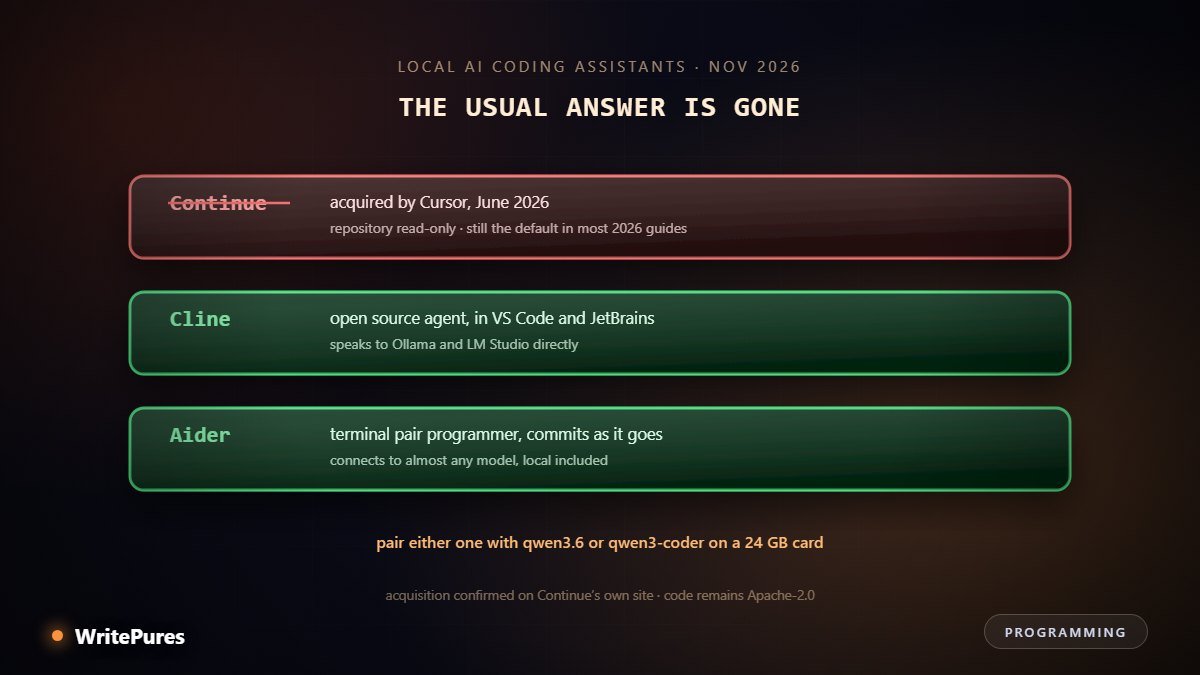
If you search for how to set up a private coding assistant, almost every guide written this year gives you the same answer: install Continue, point it at Ollama, done. That answer stopped being correct in June, when Continue was acquired and wound down. The setup still works — but it is worth knowing you are building on a project that is no longer maintained before you build on it.
What Changed This Year
Continue was acquired by Anysphere, the company behind Cursor, in June 2026. Continue's own homepage states it plainly: "acquired by Cursor". Reporting places the announcement around 16 June, the repository is now read-only and flagged as no longer actively maintained, and hosted data was deleted the following month.
The open-source code remains available under Apache 2.0, so an existing install keeps running. But it is not receiving fixes, and it will drift out of step with editor APIs and new model formats over time.
This is worth stating flatly because the search results have not caught up. Guides published and updated through 2026 — including several dated after the acquisition — still open with "install Continue". If you followed one recently, that is why.
What Works Now
| Cline | Aider | |
|---|---|---|
| Where it runs | VS Code, JetBrains, Windsurf, Cursor | Terminal |
| Style | Agent — plans, then acts, with approval | Pair programmer, commit by commit |
| Local models | Ollama, LM Studio, any OpenAI-compatible endpoint | Almost any model, local included |
| Git | You commit | Commits automatically, with messages |
| Licence | Open source | Open source |
| Best at | Multi-file changes inside the editor | Focused edits with a clean history |
Cline bills itself as "one open source agent runtime", available as a desktop app, an editor extension, a terminal CLI and an SDK. Its model page is explicit about local support — "Claude, GPT, Gemini, local Ollama / LM Studio, or any OpenAI-compatible endpoint" — and it invites you to "bring your own key or your own weights".
Aider takes the opposite approach: it lives in the terminal, works against your git repository, and commits as it goes with generated messages. For anyone who already works in a terminal, the git integration alone is a strong argument — every change is a reviewable commit rather than a diff you have to reconstruct.
One note if you visit Aider's site: its "works best with" list still names Claude 3.7 Sonnet, o1 and GPT-4o, which are no longer current. The tool connects to far newer models than that page suggests.
The Setup
Three pieces: a runtime, a model, an editor tool.
- Install Ollama. It runs as a background service with a local API, which is what both tools expect. If you would rather click than type, LM Studio exposes an equivalent endpoint — see Ollama versus LM Studio versus llama.cpp.
- Pull a coding model. On 24GB,
qwen3.6:27b-coding-mtp-q4_K_M(18GB download, 256K context). On 16GB,gpt-oss:20b(14GB).qwen3-coder:30b(19GB) is still capable if a little older. - Install Cline or Aider and point it at your local endpoint rather than a hosted provider.
Model selection by hardware is covered properly in the local model guide, and the memory arithmetic in how much VRAM you need.
What Hardware You Actually Need
| Memory | What is realistic |
|---|---|
| 8 GB | Autocomplete and small single-file edits. Agent work will frustrate you. |
| 12–16 GB | Genuinely useful chat and refactors. Agent loops are slow but workable. |
| 24 GB | The sweet spot. A 27B coding model with long context, agent work included. |
| 32 GB+ / Apple Silicon | Larger quantisations, longer context, comfortable multi-file work. |
Apple Silicon deserves its own note: unified memory means the GPU can address system RAM, so a 32GB Mac runs models that would otherwise need a 24GB discrete card.
Be Realistic About the Gains
This is where most guides oversell, so here is the counterweight.
A randomised trial by METR took 16 experienced developers working on codebases they knew well, across 246 tasks. The developers expected AI to make them 24% faster. Afterwards they believed they had been 20% faster. Measured against the clock, they were 19% slower — time moved out of writing code and into prompting, waiting and reviewing.
That study used hosted frontier models, not local ones, so if anything it flatters a local setup's competition. The researchers cautioned against over-generalising, and the result may not hold for less familiar code or less experienced developers. But it is the strongest available evidence that feeling faster and being faster are different things — which we covered in full in AI agents and automation at work.
The practical lesson: time yourself for a week rather than trusting the impression. And treat output as something to review carefully — confident errors look exactly like correct answers, and an agent acting on one changes files rather than producing an awkward sentence.
When Local Is the Right Call
- The code cannot leave. Client contracts, regulated sectors, government work. This is the strongest reason and it is not really about cost.
- Unreliable connectivity. A local model does not care about your link.
- Heavy, constant use. Subscriptions and token bills add up; our local versus API cost comparison works out where the line sits.
- You want to stop renting. No pricing changes, no deprecated models, no rate limits.
And when it is not: if you want the strongest possible model on a hard problem, hosted frontier models remain ahead, and pretending otherwise helps nobody. Our round-up of the best AI coding tools in 2026 covers that side, and our Cursor review covers the tool that just absorbed Continue.
Key Takeaways
- Continue was acquired by Cursor's parent in June 2026 and is no longer maintained, despite still topping most guides.
- Cline is the live in-editor option; Aider is the terminal option with automatic git commits.
- Pair either with qwen3.6's coding build on 24GB, or gpt-oss:20b on 16GB.
- 24GB of memory is the realistic point where agent work becomes pleasant.
- Measured evidence says developers overestimate AI speed gains — time yourself.
- The strongest case for local is code that is not allowed to leave your machine.
Written by the WritePures newsroom. Spotted something that needs updating? Tell our editors.


0 Comments
Join the conversation
Replying toNo comments yet. Be the first to share your thoughts.