

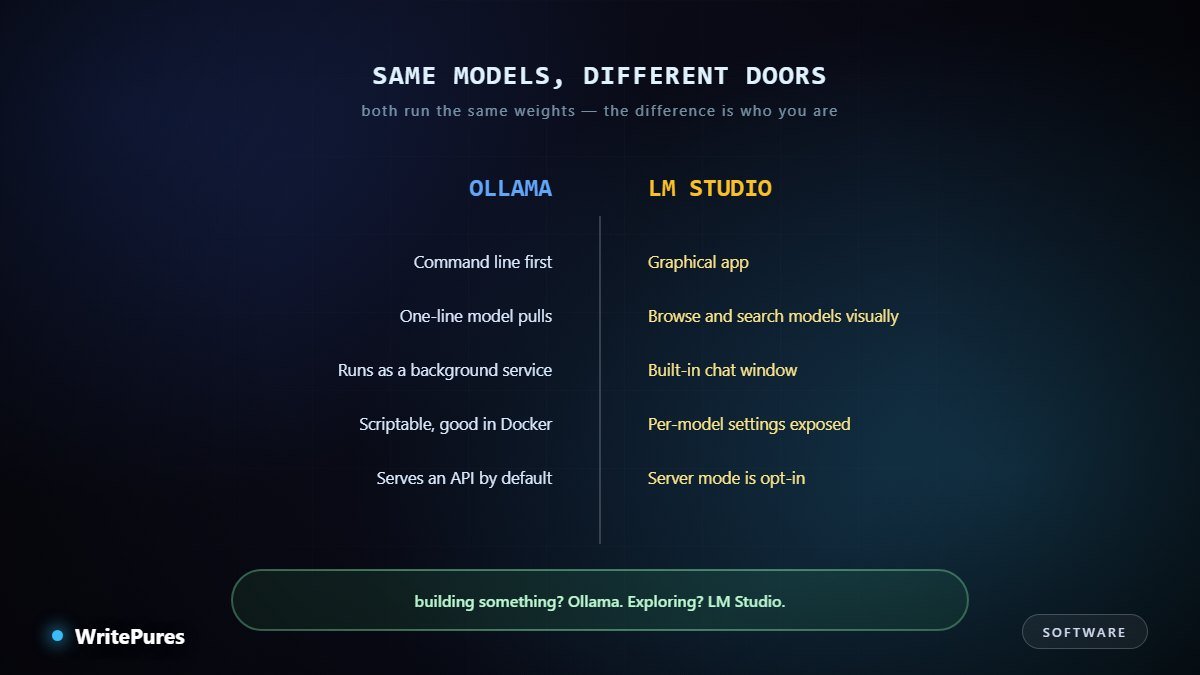
This comparison has an unusually clean answer. The two tools run the same models at the same speed and produce the same output. What differs is who they were designed for, and that makes the choice easy once you know which one you are.
What They Have in Common
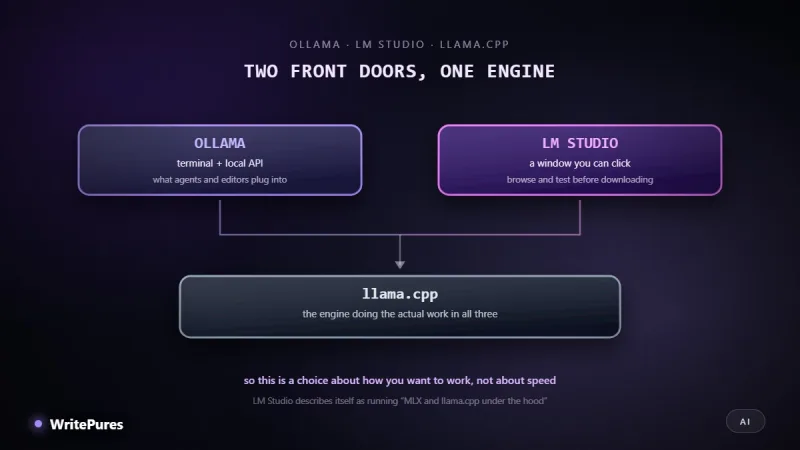
More than the comparison suggests. Both run the same open-weight models, both lean on llama.cpp underneath in most configurations, both support the same quantisation formats, and both will use your GPU where one is available.
Given the same model at the same quantisation with the same settings, output quality is identical. Any difference you notice is almost always a settings difference — a different default context length, or a different quantisation downloaded without noticing.
So this is not a quality decision. It is an interface decision.
Ollama
A command-line tool that runs as a background service.
- Model management is one line. Pull a model, run it, delete it — all from the terminal, all scriptable.
- It serves an HTTP API by default. This is the important part. Your application talks to it over HTTP much as it would to a hosted provider, so swapping between local and remote is a configuration change.
- It behaves like infrastructure. Starts with the machine, runs headless, works inside containers — relevant if you are already working with Docker.
- Configuration lives in files, which means it can live in version control alongside your project.
The cost is discoverability. Nothing shows you what options exist; you have to know what to look for.
LM Studio
A desktop application with a graphical interface.
- A searchable model browser, with sizes and quantisations visible before you download.
- A chat window built in, so you can try a model the moment it finishes downloading.
- Settings are exposed as controls — context length, GPU offload, temperature — rather than hidden behind flags.
- It can serve an API, but you turn that on deliberately.
The cost is automation. It is an application you sit in front of, not a service your code depends on.
Picking
| If you are... | Use |
|---|---|
| Building an app that calls a model | Ollama |
| New to local models | LM Studio |
| Comparing several models quickly | LM Studio |
| Running on a headless machine or server | Ollama |
| Automating or scripting anything | Ollama |
| Wanting to understand the settings | LM Studio |
| Working on a laptop, casually | LM Studio |
The short version: building something, Ollama. Exploring something, LM Studio.
The combination most people end up with
Use LM Studio to evaluate. Comparing two models side by side in a chat window takes minutes and tells you quickly whether a smaller one is good enough for your task — which is worth knowing, because a smaller model that fits comfortably beats a larger one that barely does.
Then use Ollama for what you build. The API makes your application portable between local and hosted, which matters more than it sounds: it means the decision in our cost comparison stays reversible instead of locking you in.
One practical warning: each keeps its own model store, so running both can mean the same multi-gigabyte weights downloaded twice. Check your disk before installing the second one.
Things That Catch People Out
- Default context length is often short. Both tools pick a conservative default to avoid exhausting memory. If a model seems to forget earlier messages, this is usually why, and it is a setting rather than a limitation of the model.
- The quantisation you get is the one you picked. Model names carry a suffix indicating precision, and downloading the wrong one is the most common cause of "it does not fit" or "it is worse than I expected".
- GPU offload is not always automatic. Both can run partly or entirely on the CPU. If generation is crawling, check how many layers actually went to the GPU before blaming the hardware.
- Models are large and accumulate silently. Several downloads at several gigabytes each fill a drive faster than expected, particularly on a laptop.
- Ollama keeps running after you close the terminal. That is the point — it is a service — but it surprises people who expect the process to end with the window.
None of these are faults in either tool. They are the handful of settings worth understanding once, after which both behave predictably.
Before You Install Either
Work out what your hardware can hold. Both tools will happily let you download something that does not fit and then run it badly, which is the most common first disappointment — our VRAM guide gives the arithmetic in one line. Then see which models are worth running.
Key Takeaways
- Same models, same engine, same output quality — this is an interface choice.
- Ollama is a service with an API: scriptable, headless, container-friendly.
- LM Studio is an app: model browser, chat window, visible settings.
- Building something, Ollama. Exploring something, LM Studio.
- Running both duplicates model downloads — watch your disk.
Written by the WritePures newsroom. Spotted something that needs updating? Tell our editors.

0 Comments
Join the conversation
Replying toNo comments yet. Be the first to share your thoughts.