

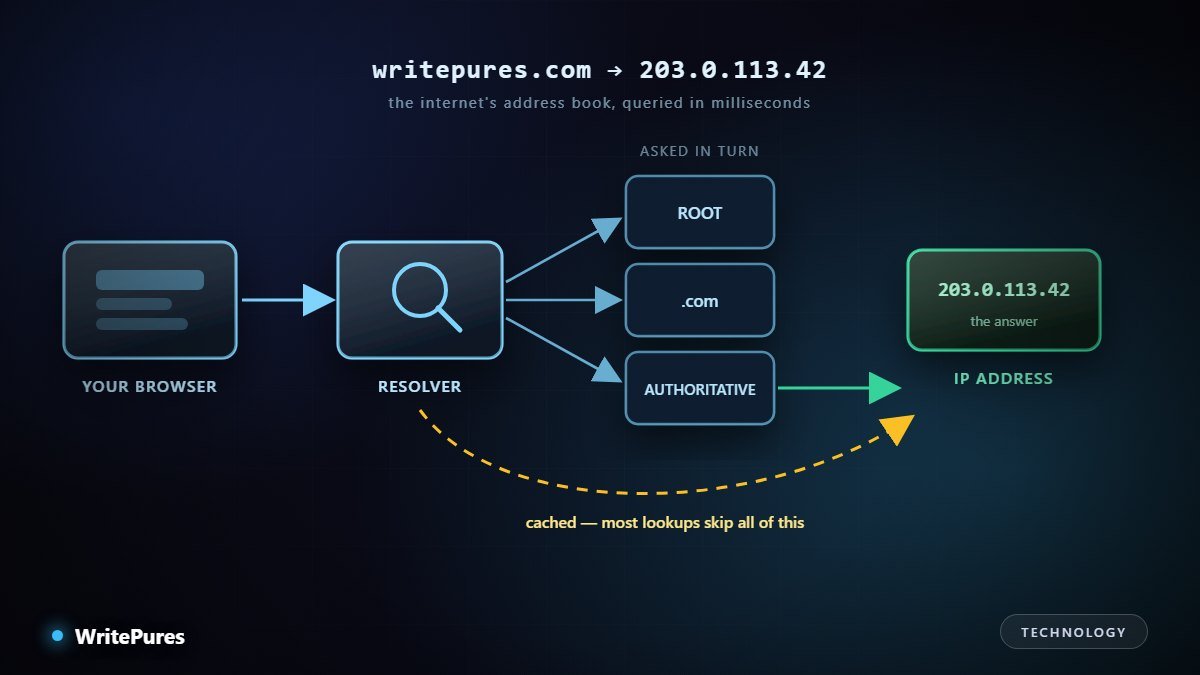
Type a domain name and the page appears. In between, your device runs a lookup that may involve several servers scattered across the world and still completes faster than you can notice. It is the single most-used service on the internet, and the one most people never think about until something breaks.
The Problem DNS Solves
Computers route traffic to numeric addresses. People remember names. DNS is the directory in between, translating writepures.com into an address a packet can actually be sent to.
It could not be one big list. The directory has to be constantly updated by millions of independent owners, answer billions of queries a second, and keep working when parts of it fail. So instead of one file, DNS is a distributed hierarchy — and nearly everything odd about its behaviour follows from that.
The Lookup, Step by Step
Assume nothing is cached anywhere, which is rare but shows the full chain.
- Your device checks itself first — its own cache, and the hosts file. If the answer is there, the lookup ends immediately.
- It asks a resolver, usually run by your ISP or a public provider. The resolver does the real work and is the only part most users could change.
- The resolver asks a root server. The root does not know the answer; it knows who handles
.com, and says so. - The resolver asks the .com servers. They do not know either, but they know which nameservers are authoritative for your domain.
- The resolver asks the authoritative nameserver. This one holds the actual record and returns the address.
- The resolver caches it and replies to your device, which also caches it.
Each step narrows the question. No server holds the whole directory, and no single failure takes it all down — which is the entire design goal.
Why you almost never see this
Caching. Once a resolver has an answer it serves it directly to everyone asking, for as long as the record's TTL allows. For popular domains the full chain is walked rarely; the overwhelming majority of lookups are answered from cache in a millisecond or two.
This is also the single biggest source of confusion with DNS, because it means changes are not instant and are not consistent between people.
The Records Worth Knowing
| Record | What it does | Where it bites |
|---|---|---|
| A / AAAA | Name → IPv4 / IPv6 address | The basic one; AAAA is often forgotten |
| CNAME | Name → another name | Cannot coexist with other records on the same name |
| MX | Which servers receive mail | Wrong priority or a missing record silently breaks email |
| TXT | Arbitrary text | Holds SPF, DKIM and verification strings |
| NS | Which nameservers are authoritative | Changing these moves the whole domain |
| TTL | How long answers may be cached | Decides how long a mistake lingers |
If you send email from your domain, the TXT records are not optional housekeeping — SPF and DKIM are what stop your mail being filed as spam, and they are a common reason legitimate mail disappears.
Diagnosing It When a Site Will Not Load
DNS gets blamed for a lot it did not do. These checks separate the cases quickly.
- Resolve the name directly.
nslookup example.comordig example.com. If you get an address, DNS is working and the problem is elsewhere. - Query a different resolver.
dig @1.1.1.1 example.com. A different answer means caching, not a broken record. - Ask the authoritative server. That is the source of truth; if it is right, you are waiting on TTLs.
- Check from another network. Mobile data versus office Wi-Fi isolates local resolver problems instantly.
- Flush your local cache only after the above — it is the step people try first and it rarely helps.
The useful habit: before changing any record, lower its TTL a day ahead. Then the old value expires in minutes rather than hours, and you can revert quickly if the change is wrong.
Privacy, Security and the Encrypted Variants
- Classic DNS is plain text. Anyone on the network path can see which domains you are resolving.
- DNS over HTTPS and DNS over TLS encrypt the query between you and your resolver. Real privacy gain — but your resolver still sees everything, so you are choosing who to trust rather than trusting nobody.
- DNSSEC is a different problem: it signs answers so they cannot be forged in transit. It authenticates, it does not conceal.
- DNS is also an attack surface. A hijacked registrar account or altered nameserver records can redirect an entire domain, including its mail. Registrar lock and multi-factor authentication on the registrar account matter more than most people assume — losing the domain is worse than losing the server.
For how traffic physically travels once the address is known, see our explainer on undersea internet cables, and how data centres work for what sits at the other end.
Key Takeaways
- DNS is a distributed hierarchy, not a single directory — that is why it survives failures.
- A full lookup walks root, TLD and authoritative servers; caching means it rarely happens.
- TTL decides how long changes take, and how long mistakes last. Lower it before making changes.
- CNAME is not interchangeable with A, and TXT records are what keep your email deliverable.
- Encrypted DNS hides queries from the network, not from your resolver; DNSSEC authenticates rather than hides.
Written by the WritePures newsroom. Spotted something that needs updating? Tell our editors.
0 Comments
Join the conversation
Replying toNo comments yet. Be the first to share your thoughts.